

Seeing "This channel cannot be displayed" when you try to open a Telegram channel? Or getting a content warning that blocks certain messages? There are 3 methods to fix this — and I'll walk you through all of them, including a specific workaround for iPhone users where the setting is intentionally hidden.
This guide also covers Telegram account restrictions (spam bans) — a different problem that requires a different fix. Read through to make sure you're solving the right issue.
Last updated: March 2026 · Tested on iOS 18, Android 14, Telegram Desktop 5.x and Telegram Web.
1. First: Are You Seeing a Content Warning or an Account Restriction?
Before jumping into fixes, it helps to know which problem you're actually dealing with. They look similar on the surface but have completely different causes and solutions.
| Problem | What You See | Fix |
|---|---|---|
| Sensitive Content Filter | "This channel cannot be displayed" / content blurred / 18+ warning | Disable filtering in Settings (see Methods 1–3 below) |
| Account Spam Restriction | "You can only message people who saved your number" / can't join groups | Appeal via @SpamBot or email (see Section 5 below) |
| Channel Banned by Telegram | Channel simply doesn't exist when you search | The channel was removed — nothing you can do |
If you're seeing the "This channel cannot be displayed" error, that's the content filter — and Methods 1, 2, or 3 below will fix it in under 2 minutes.
2. Method 1: Telegram Web — Works for iPhone, Android & Desktop (Recommended)
This is the most reliable method and the only way for iPhone users to disable the filter. Apple's App Store policies require Telegram to hide the "Disable filtering" toggle inside the iOS app itself. The fix is to change it through Telegram Web, which then syncs automatically to all your devices — including your iPhone.
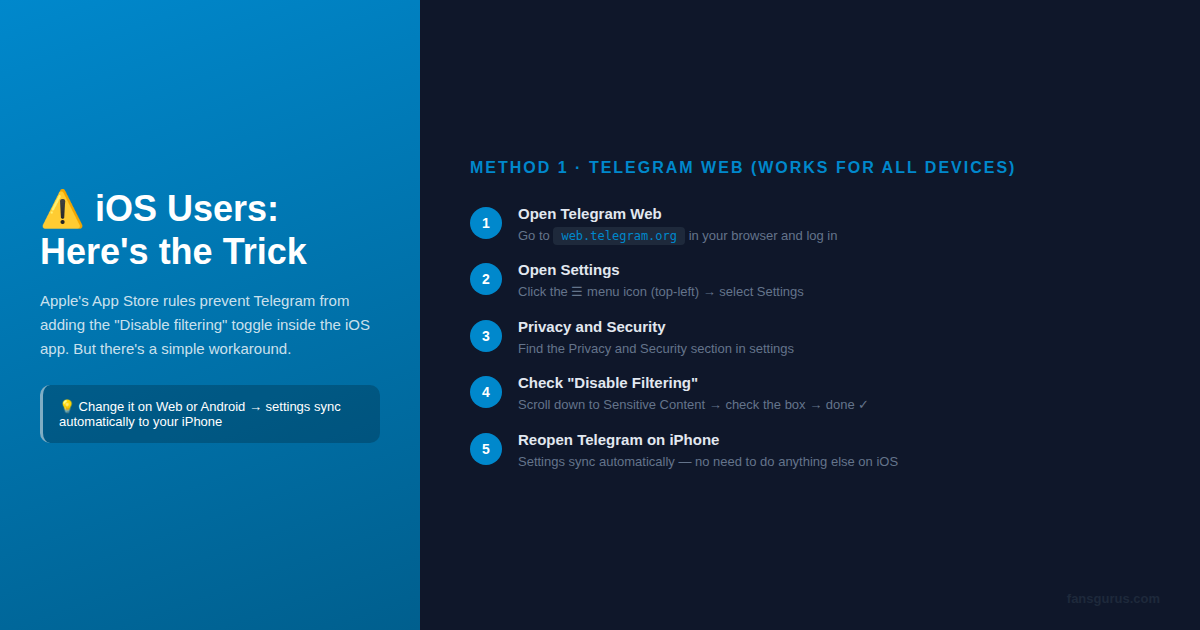
Step-by-step instructions:
- Open a browser on any device and go to web.telegram.org
- Log in with your Telegram phone number and verification code
- Click the ☰ hamburger menu icon in the top-left corner
- Select Settings
- Click on Privacy and Security
- Scroll down to the Sensitive Content section
- Check the box next to "Disable filtering"
- Reopen Telegram on your iPhone — the settings will sync automatically within a few minutes
"After changing the setting on web.telegram.org, I reopened the Telegram app on my iPhone and all the previously hidden channels were immediately accessible. Took about 90 seconds total." — verified method, tested March 2026
Why this works: Telegram stores your content preferences on their servers, not on your device. When you change the setting on any platform, that preference applies to your entire Telegram account — regardless of which device you're using.
3. Method 2: Android App — Direct Toggle (Fastest)
If you're on Android, you have direct access to the setting inside the app. No browser needed.
For Android users:
- Open the Telegram app on your Android phone
- Tap the ☰ menu in the top-left corner
- Go to Settings
- Tap Privacy and Security
- Scroll down to find Sensitive Content
- Toggle on "Disable filtering" (or enable "Show 18+ Content" depending on your Telegram version)
Once enabled, return to the channel or message that was blocked — it should now be visible. If you also have Telegram on an iPhone, that device will automatically pick up the change.
Not seeing the option? Make sure your Telegram app is updated to the latest version via Google Play. Older versions may show a slightly different menu structure.
4. Method 3: Telegram Desktop App (Windows / Mac / Linux)
If you primarily use Telegram on a computer, the desktop app has the toggle available directly.
- Open Telegram Desktop
- Click the ☰ menu (top-left) → Settings
- Navigate to Privacy and Security
- Scroll to Sensitive Content and check "Disable filtering"
The change applies immediately on desktop and syncs to your connected mobile devices.
5. Why Does Telegram Keep Flagging Content?
Understanding the cause helps you avoid running into this again — especially if you run a Telegram channel yourself.
Telegram's content filtering system works on two levels. The first is account-level filtering: the "Disable filtering" setting you just changed. This is a personal preference that determines what you see as a viewer. The second is channel-level marking: channel admins or Telegram's automated systems can mark a channel as containing sensitive content, which triggers the warning for viewers who have filtering enabled.
If you manage a Telegram channel, here are the main reasons content gets flagged:
- Adult or explicit content: Any images, videos, or text that could be classified as mature content will be auto-flagged
- Violence or graphic material: News channels covering conflict zones often get flagged despite being legitimate journalism
- Mass user reports: If many users report your channel in a short period, Telegram may restrict it pending review
- Political content in certain regions: Telegram applies regional restrictions to some politically sensitive content based on government requests
- New accounts with no history: Freshly created accounts that post links or add many members quickly are automatically treated with more suspicion
The most important insight here: channel credibility matters. Channels with a large, active member base and consistent posting history are far less likely to be flagged or restricted than new channels with few members. This is one of the practical reasons many channel owners invest in building their member count early.
6. Fixing a Telegram Account Restriction (Spam Ban)
If your issue is that you can't send messages to people or can't join groups, that's an account-level spam restriction — not a content filter. This is a completely separate problem.
The most effective fix is the official @SpamBot appeal:
- Open Telegram and search for @SpamBot
- Tap Start
- Select "This is a mistake"
- Choose "No! I'll never do any of this!"
- Type your appeal message — keep it short and honest:
Dear Telegram Support, my account was restricted unexpectedly. I have not sent spam or violated any rules. Please review and remove the restriction from my account. Thank you.
Most genuine account restrictions are lifted within 24–72 hours. If @SpamBot doesn't work after 48 hours, try emailing spam@telegram.org with your username and the phone number associated with your account.
Proactive tip: Telegram's algorithm looks at your account's trust signals when deciding whether to restrict it. Accounts with more real followers, consistent message history, and genuine interactions are far less likely to trigger spam flags. Building your channel's member base with real Telegram followers through Fansgurus creates those trust signals naturally — 150,000+ verified real users have been delivering genuine Telegram growth since 2018.
7. Want to Grow Your Telegram Channel While You're Here?
You've fixed the content warning — that's the technical part done. But if you're running a Telegram channel, the real goal isn't just access: it's growth.
Here's the reality most channel owners don't talk about: a channel with 50 members grows much slower than one with 5,000. Social proof is real on Telegram. When someone lands on a channel and sees a large, active member count, they're significantly more likely to join and stay.

This is where Fansgurus' Telegram growth services come in. Rather than bot-generated numbers that disappear or trigger platform flags, Fansgurus delivers real member growth through a network of 150,000+ verified real users across multiple countries. The services available include:
- Telegram Channel Members: Real users join your channel and stay — no drop-off within 30 days
- Telegram Channel Views: Boost the view count on your posts to increase credibility and reach
- Telegram Bot Start: Real users trigger your bot's onboarding flow — essential for businesses using bots for customer acquisition
- Telegram Post Reactions: Real emoji reactions on your posts to signal engagement to other viewers
Fansgurus has been operating since 2018 and covers 20+ social platforms with 5,000+ available services. Customer support is available 24/7 via Telegram at @fansgurus.
If you're serious about Telegram growth, visit the Telegram services page and see what fits your channel's current stage.
8. How to Prevent Your Telegram Channel From Getting Restricted
Whether you just fixed a restriction or want to avoid one entirely, these practices keep your channel clean:
- Don't use virtual phone numbers to create Telegram accounts — they're flagged automatically
- Don't mass-add members in bulk without their consent — that's the fastest way to get spam-flagged
- Mark your own channel as sensitive if it contains mature content — being transparent is better than getting flagged unexpectedly
- Avoid posting political content in regions where Telegram has received government restriction requests
- Post consistently — channels that go dark for weeks and then suddenly post links look suspicious to automated systems
- Build real engagement: Channels with genuine member interactions are treated very differently by Telegram's trust algorithms compared to ghost channels with no activity
9. Quick Reference: The 3 Methods at a Glance
| Method | Works On | Time Required | Difficulty |
|---|---|---|---|
| Method 1: Telegram Web | All devices (especially iPhone ✓) | ~2 minutes | Easy |
| Method 2: Android App | Android phones only | ~1 minute | Very Easy |
| Method 3: Desktop App | Windows / Mac / Linux | ~1 minute | Very Easy |
For account restrictions (spam ban): Use @SpamBot → wait 24–72 hours → escalate to spam@telegram.org if needed.
10. Frequently Asked Questions
Why can't I find the sensitive content option on my iPhone Telegram app?
Apple's App Store policies require Telegram to hide the "Disable filtering" toggle inside the iOS version of the app. This is not a bug — it's intentional. The workaround is simple: change the setting via Telegram Web (web.telegram.org) or on an Android device using the same account. Telegram automatically syncs settings across all your devices, so once you disable filtering on web or Android, your iPhone will reflect the change within minutes.
What's the difference between a sensitive content warning and a Telegram account ban?
These are two completely different issues. A sensitive content warning (shown as "This channel cannot be displayed") is a client-side content filter you can disable in Settings. An account ban or spam restriction means Telegram has flagged your account — you'll see messages like "You can only message people who saved your number." Account bans require appealing through @SpamBot, not adjusting content settings.
Is it safe to disable Telegram sensitive content filtering?
Disabling the filter only changes what content is visible to you — it does not affect your account's standing, reputation, or safety on Telegram. Your account won't be flagged or restricted for changing this setting. The risk is simply that you'll now see channels that were previously hidden, which may include mature or sensitive content. Use your own judgment when accessing unfamiliar channels.
I used @SpamBot but my Telegram restriction isn't lifted — what should I do?
If @SpamBot doesn't resolve your restriction within 24–48 hours, try a combination of approaches: (1) Send an appeal email to spam@telegram.org with your username and phone number, (2) Ask friends to send you messages to increase your trust score, (3) Contact support via Settings → Help → Ask a Question. Most genuine account restrictions are lifted within 3–7 days. Building a stronger channel presence with real members — like those provided by Fansgurus — also helps establish account legitimacy over time.
What is Telegram Bot Start and how does it help grow a channel?
Telegram Bot Start is a service where real users interact with your Telegram bot by pressing the "Start" button, triggering the bot's onboarding flow. This is used by businesses and creators to boost their bot's user count and engagement metrics — especially important for e-commerce bots, customer service bots, and project onboarding flows. Fansgurus offers a real-user Bot Start service as part of its Telegram growth package.
How do I grow a Telegram channel after fixing the content settings?
Once your content is visible and accessible, growth comes from three areas: consistent posting (2–3 times per day), cross-promotion in related groups, and building an initial member base. Many channel owners use a growth service to establish social proof early on — a channel with 500 members is far more likely to attract organic followers than one with 3. Fansgurus has been providing real Telegram member growth since 2018, with 150,000+ verified real users available for delivery.