This guide cuts through the confusion. You'll learn exactly what type of suspension you're dealing with, why it happened, how to file an appeal that actually works, and how to rebuild your account after you're back — all in one place.
Before jumping into the appeal process, here's something worth knowing upfront: many accounts get flagged or suspended precisely because they lack social credibility — low follower counts and minimal engagement make accounts look suspicious to X's algorithm. If you want to avoid repeat suspensions after recovery, building a foundation of real, active followers matters. Fansgurus' Twitter growth service delivers high-quality followers from real, active accounts — with free refills if any drop off — helping you establish the social proof that keeps the algorithm on your side.
1. First, Identify What's Actually Happening to Your Account
Most people use "suspended," "banned," and "locked" interchangeably — but they mean very different things on X. Misidentifying your situation leads to wasted effort. Here's a clear breakdown:
| Status Type |
What You'll See |
Severity |
How to Fix It |
| Temporary Lock |
Prompted to verify via phone or email; some features disabled but account accessible |
⭐ Low |
Complete the verification — usually resolves immediately |
| Limited / Read-Only Mode |
Can log in but can't post, like, or follow; only your followers see your content |
⭐⭐ Moderate |
Delete flagged content and wait for the restriction to lift |
| Suspended Account |
Can't log in; profile shows "Account suspended"; not searchable on X |
⭐⭐⭐ Serious |
File an official appeal via X Help Center; awaits human review |
| Permanent Suspension |
X explicitly states the account will not be restored; usually tied to repeated or severe violations |
⭐⭐⭐⭐ Most Severe |
Appeal is still possible but success rate is lower; first submission quality is critical |
How to check: Try logging in at x.com. If you see a prompt asking for verification, you're dealing with a temporary lock. If you see "Account suspended" and can't access your profile at all, you need to go through the formal appeal process.
2. Why Did X Suspend Your Account? The 6 Most Common Reasons in 2026
Understanding why you were suspended isn't just about curiosity — your appeal needs to directly address the likely cause. Here's what triggers the majority of suspensions.
Reason 1: High-Frequency Actions That Look Automated
Mass-following, liking hundreds of posts in a short window, or blasting out similar tweets in rapid succession — X's system doesn't look at what you did, it looks at whether your behavior patterns like a human. New accounts that hit the ground running too fast are almost guaranteed to trip the algorithm.
Reason 2: Unstable or Frequently Changing Login Environments
Logging in from multiple devices, different IP addresses, or switching between locations too quickly raises red flags. X's security system monitors login patterns for physical plausibility — if your account "travels" faster than a human can, it assumes compromise and locks the account to protect it.
Reason 3: Spam-Like Content or Messaging
Sending identical DMs to large numbers of users, posting the same promotional copy repeatedly, or flooding unrelated threads with your links — these behaviors mirror what bot accounts do. You don't have to actually be running automation to get flagged for it.
Reason 4: Content Violations or Repeated User Reports
Posts that violate X's Community Guidelines around harassment, hate speech, misinformation, or copyright — especially when reported by multiple users — can trigger both automated and manual enforcement. A spike in reports on your account is a fast path to suspension.
Reason 5: Incomplete Account Profile
No profile photo, no bio, no linked phone or email, no posting history — X's risk model treats these accounts as inherently suspicious. Incomplete accounts are far more likely to be flagged as inauthentic, and far harder to appeal when they are.
Reason 6: Third-Party Automation Tools
Scheduling tools, auto-follow scripts, engagement bots — if the app or service you're using accesses the X API in ways that violate its developer terms, your account takes the hit. In 2026, X's detection is significantly more sophisticated than it was even two years ago.
"The most common reason accounts get suspended isn't posting bad content — it's behaving in ways that don't match how real humans use the platform. The closer your account activity mirrors organic behavior, the safer it is."
3. Quick Fix First: Self-Service Verification (For Temporary Locks)
If X has flagged your account for security reasons rather than rule violations, you'll usually see an on-screen prompt to verify your identity. This doesn't require an appeal — just follow the steps.
Phone Number Verification
- Click the "Start" button on the lock screen
- Enter the phone number linked to your account
- Enter the SMS verification code when it arrives
- Your account functions should restore immediately
Email Verification
- Click "Send Email" on the lock screen
- Check your inbox for a message from X (also check Spam and Promotions folders)
- Enter the verification code from the email
- Submit and confirm
reCAPTCHA / Image Verification
Some lock screens require a visual verification step. Get it right on the first try — repeated failures can escalate your account's risk score and make it harder to recover.
If completing verification doesn't restore your account — or if you're seeing "Account suspended" rather than a verification prompt — you'll need to move on to the formal appeal process below.
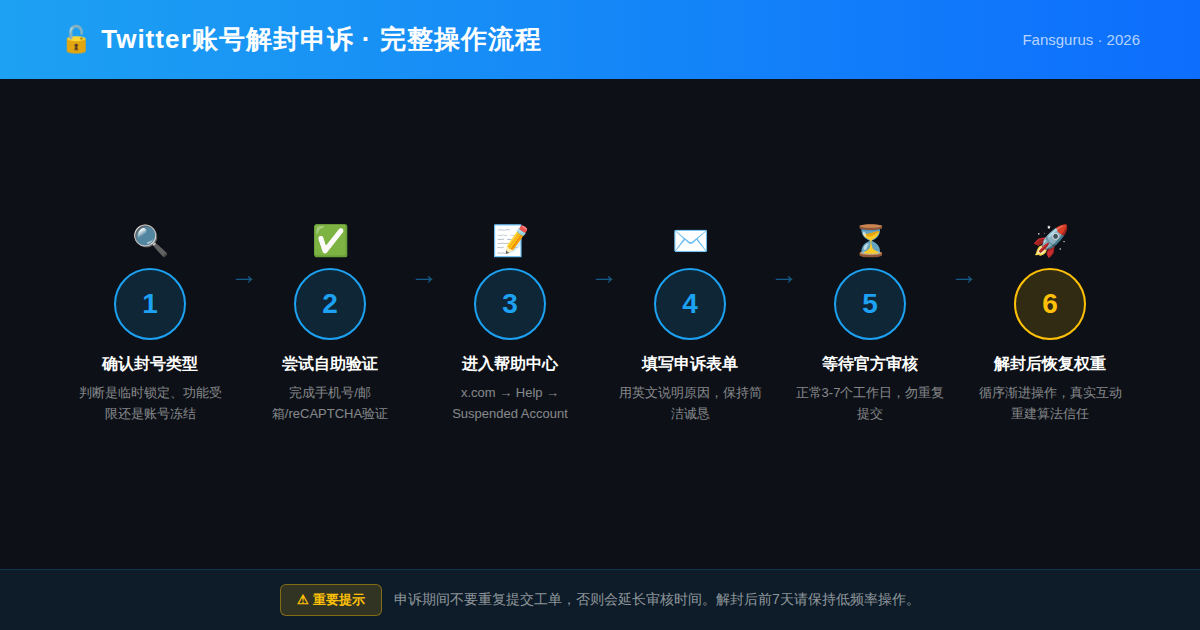
4. How to File a Twitter/X Suspension Appeal — Step by Step
The appeal process is straightforward, but each step matters. X processes a large volume of appeals, so presenting your case clearly and completely in a single submission is far better than filing multiple requests.
Step 1: Log Into Your Suspended Account
Go to x.com and sign in with the suspended account's credentials. You'll land on the suspension notice page.
Step 2: Access the Appeal Form
From the suspension notice, look for the link that says "You can appeal if you think we made a mistake." Alternatively, navigate directly to the X Help Center appeal form:
- Web browser: Go to help.x.com/en/forms → click "Locked and Suspended Account"
- X App: Home → Help Center → Support Team → Suspended Account
Important: You must be logged into the suspended account to access this form. If you're logged into a different account, the form will ask you to switch.
Step 3: Fill Out the Appeal Form
The form will ask for:
- Your full name
- Your X username (@handle)
- The email address registered to the account
- A description of the issue and why you believe the suspension was a mistake
Step 4: Submit and Monitor Your Email
Once submitted, X generates a support ticket and sends updates to your registered email. Standard response time is 3–7 business days. Complex cases — particularly those flagged for automation or multiple violations — can take up to two weeks.
While you wait:
- Do not submit duplicate appeals — this restarts your position in the queue
- Check your spam/promotions folder regularly
- You can monitor appeal status via X's Help Center → Account Support
5. Appeal Letter Templates — Copy, Customize, and Send
Your appeal letter is the single most important factor in whether X reinstates your account. Keep it concise, factual, and professional. Aim for three things: confirm your identity, explain why the suspension was a mistake, and commit to following the rules going forward.
Template A: Wrongful Suspension / Mistaken Flag (Most Common Scenario)
Dear X Support Team,
I am writing to appeal the suspension of my X account (@YourUsername). I believe this suspension was made in error.
I am a real person who has been using this account for [personal use / professional networking / content creation / brand communication]. I have not engaged in spam, automated behavior, harassment, or any activity that violates X's Community Guidelines or Terms of Service.
I believe the suspension may have been triggered by a recent change in my login environment — not by any policy violation on my part. I have never used third-party automation tools, bots, or scripts to interact with the platform.
I respectfully request that you review my account activity and restore my access. I am happy to provide any additional information that may assist your review.
Thank you for your time.
Sincerely,
[Your Full Name]
Account: @YourUsername
Registered Email: [Your Email Address]
Template B: Acknowledging a Mistake (If You Know What Triggered It)
Dear X Support Team,
I am reaching out regarding the suspension of my account (@YourUsername).
I acknowledge that my recent account activity may not have been fully in line with X's platform rules. Specifically, I may have [briefly describe: e.g., "posted too frequently within a short period" or "used a scheduling tool that accessed the API in a non-compliant way"]. I take full responsibility for this.
Since the suspension, I have thoroughly reviewed X's Community Guidelines and Terms of Service. I am committed to using the platform in a way that fully complies with all rules going forward. This account is important to me, and I genuinely want to participate in the X community responsibly.
I respectfully request that you consider reinstating my account. I am happy to complete any verification steps or provide additional information as needed.
Thank you for your consideration.
Sincerely,
[Your Full Name]
Account: @YourUsername
Registered Email: [Your Email Address]
Appeal writing tips:
- Keep it under 300 words — shorter, focused appeals tend to perform better
- Never accuse X of bias or make threats; it will work against you
- Make sure the name, username, and email you provide match your account registration exactly
- Stick to one core argument per appeal — don't pile on multiple justifications
- If you have specific tweet IDs or dates that support your case, reference them
6. Account Restored — Now Don't Blow It. Here's How to Rebuild Properly
Getting unsuspended is only half the battle. The moment your account is restored, X's system keeps a close watch on it. Any unusual activity in the first week or two can trigger another flag — and a second suspension is often harder to appeal than the first.
The First Two Weeks: A Phased Comeback
| Timeframe |
Recommended Actions |
Avoid |
| Days 1–3 |
Complete your profile (photo, bio, phone, email, 2FA) — no posting yet |
Mass following, liking, or posting |
| Days 4–7 |
Post 1–2 original tweets per day; engage naturally with a few relevant conversations |
Promotional links, repetitive content |
| Week 2 onwards |
Gradually increase posting frequency; resume normal operations |
Automation tools, bulk DMs |
Rebuilding Your Account's Algorithmic Trust
After a suspension, your account enters what many operators call an "authority reset" — your content gets lower organic reach until the algorithm reestablishes trust in your account. This is the phase where most people stall out, waiting weeks for traction that never seems to come.
One approach that's proven effective for many brand and creator accounts is seeding the account with genuine follower and engagement data to accelerate the trust-building process. Fansgurus' Twitter growth service has been operating for over 8 years and maintains a pool of 240,000+ real, active users who execute follows and engagement from their authentic social accounts — no bots, no fake profiles. That kind of real social signal helps your content start getting traction again, rather than sitting invisible while the algorithm makes up its mind about you.
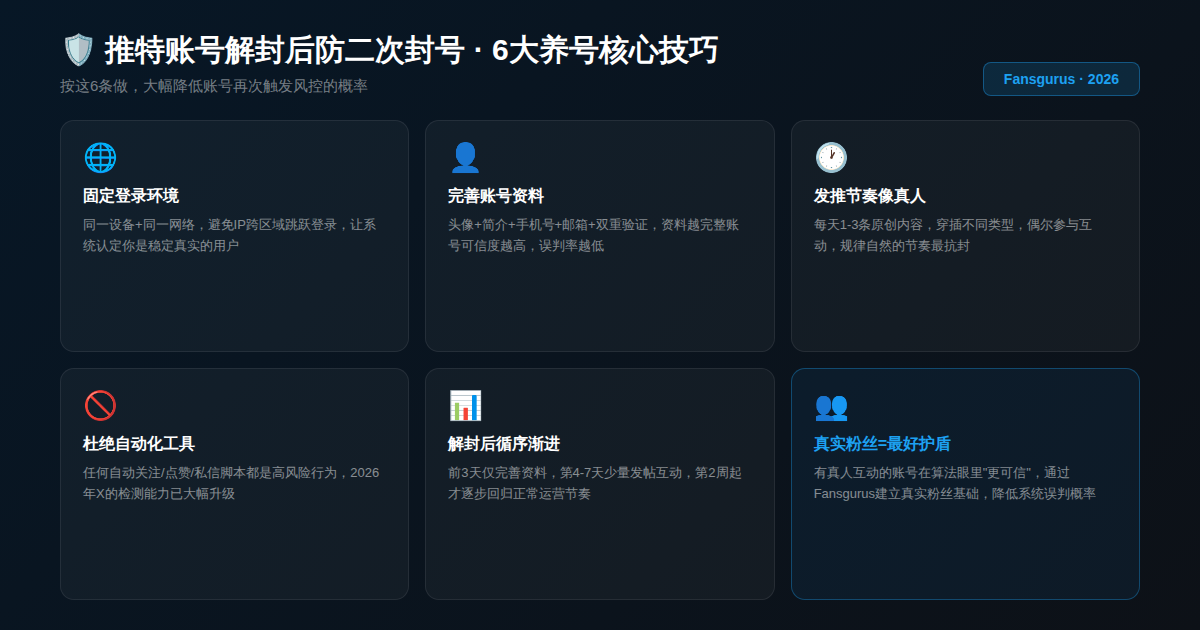
7. How to Prevent Getting Suspended Again — The Long-Term Playbook
Recovery is reactive. Prevention is where the real work happens. These habits will keep your account safe long after you've gotten back in.
7.1 Lock Down Your Login Environment
Use the same device and network connection as consistently as possible. If you travel frequently or manage accounts in multiple locations, use a stable, consistent proxy rather than hopping between random IPs. Stability reads as authenticity to X's system.
7.2 Complete Your Profile — Fully
Profile photo, bio, verified email, linked phone number, and two-factor authentication (2FA) enabled. These aren't optional extras — they're signals that tell X's risk model you're a real, accountable human being. Incomplete accounts get less algorithmic benefit of the doubt.
7.3 Post Like a Human, Not a Scheduler
Vary your content types. Mix original takes, replies, retweets, and media. Post at irregular but consistent intervals — not at the exact same minute every day. Engage occasionally with conversations outside your immediate niche. The goal is unpredictable regularity, not clockwork automation.
7.4 Ditch Automation Tools Entirely
Any tool that touches your account's API access — auto-follow scripts, engagement pods, bulk DM services — is a liability in 2026. X's detection has advanced considerably. If you're using these, it's a question of when, not if.
7.5 Real Followers Are Your Best Insurance
Accounts with active, genuine followers and consistent engagement get more algorithmic latitude. X's system gives more trust to accounts that look like real community hubs — and less scrutiny to accounts that have established, verifiable credibility.
If your account is starting fresh or rebuilding after a suspension, using Fansgurus to grow your Twitter following with real, active users is a legitimate and widely-used way to build that credibility baseline. Stable follower counts from real people — not inflated numbers from ghost accounts — signal legitimacy to both the algorithm and your audience.
8. When Things Get Complicated — Edge Cases and What to Do
No Response After 7+ Business Days
- Check your spam, promotions, and junk mail folders thoroughly
- Verify the registered email on your account is spelled correctly
- Log in to x.com and check your Help Center → Account Support for appeal status updates
- If still nothing after 2 weeks, consider resubmitting — once, not repeatedly
Your Appeal Was Rejected
A rejection isn't necessarily final. You can submit again — but don't copy-paste the same message. Change your angle. If the first appeal focused on it being a mistake, the second might focus on a specific behavior that could have been misread and your commitment to changing it. Vary your approach, not just your wording.
Permanent Suspension
User reports consistently indicate that permanent suspensions are difficult to reverse — but not impossible. The quality of your first appeal submission matters enormously. If multiple attempts fail, starting a new account with a clean phone number, email, and device is often the most practical path forward. Build it right from day one.
9. Frequently Asked Questions
How long does a Twitter/X account suspension last?
It depends on the type of restriction. A temporary lock resolves as soon as you complete phone or email verification. Read-only mode restrictions typically lift within 24–72 hours once you've addressed the flagged behavior. If you've filed a formal suspension appeal, expect a response within 3–7 business days — complex cases can take up to two weeks. There's no guaranteed timeline, and repeat submissions can delay the process.
What should I write in my Twitter suspension appeal?
A strong appeal covers three things: proof that you're a real person (not a bot), a clear explanation of why the suspension was a mistake or the context behind the flagged behavior, and a commitment to following X's rules going forward. Keep it under 300 words, maintain a professional tone, and avoid emotional language. The templates in Section 5 of this guide are ready to customize and use directly.
Can you recover a permanently suspended Twitter account?
It's possible, but success rates are low. X processes permanent suspension appeals through the same Help Center form as regular suspensions. What matters most is the quality of your first submission — after multiple rejections, your chances diminish further. If you've exhausted appeals, creating a new account on a fresh phone number, email, and device is often the more realistic route. Build the new account correctly from the start.
How do I restore my account's reach and authority after being unsuspended?
After a suspension, X's algorithm places your account in a low-trust state — content gets limited distribution while the system re-evaluates you. The fastest way to rebuild is through consistent posting, genuine engagement, and a growing base of real, active followers. Fansgurus' Twitter growth service — operational for over 8 years — provides follower and engagement data from real accounts, helping restored accounts regain organic reach faster than waiting alone.
How do I avoid getting suspended on Twitter again?
The core principle is simple: act like a human. Keep your login environment consistent, post at natural rhythms, engage authentically, and don't use any automation tools. Complete your profile fully and enable two-factor authentication. Accounts with genuine, active followers also receive more algorithmic trust, which reduces the likelihood of being misidentified as a bot or spam account going forward.
My Twitter appeal was rejected — can I try again?
Yes, but wait at least 7 days before resubmitting. More importantly, change your approach — don't reuse the same argument or wording. Try a different angle: if the first appeal argued it was a system error, the second might acknowledge specific behaviors that could have been misread and explain why they weren't violations. Repetition rarely changes outcomes; a genuinely different argument might.
Can I create a new Twitter account if mine is suspended?
Technically yes, but X explicitly prohibits creating new accounts to evade a suspension. The platform cross-references IP addresses, device fingerprints, and other signals to detect linked accounts. If a new account is tied to a suspended one, it risks being banned too. If you create a new account, use a completely different phone number, email, and device — and make sure to build it properly from day one to avoid repeating the same issues.
10. Suspended Doesn't Mean Done — But You Need to Play It Right
Most Twitter/X suspensions — especially first-time ones — are recoverable. The algorithm isn't personal; it's pattern-matching. When your account patterns looked suspicious, it reacted. When you demonstrate you're a real, rule-following user, it usually backs off.
The process takes patience. File one solid appeal, wait it out, and follow the recovery steps in this guide. And once you're back, invest in building an account that the algorithm actually respects: real content, real engagement, real followers.
If you're ready to rebuild your Twitter presence on a solid foundation, Fansgurus' Twitter growth service offers real follower growth backed by 8+ years of experience, 240,000+ genuine users, and a free refill guarantee. It's how serious creators and brands build social credibility that lasts — and that keeps the algorithm working for them, not against them.